Reducing Cognitive Load in

Stardew Valley

A conceptual interface mod for Stardew Valley, designed to support neurodivergent players by reducing cognitive friction without lowering difficulty.

Role

Solo — research and design (personal case study)

Timeline

2 months

Client

N/A (personal project)

Build in

Figma

Introduction

Stardew Valley is often described as a cozy game. Its pixel farm, unhurried seasons, and gentle rhythm make it a place players return to when they want to relax. Yet beneath that calm atmosphere, the game constantly asks players to keep track of information: birthdays, quest deadlines, crop schedules, animal care, and dozens of small details spread across different menus and moments.


For many players, this is simply part of the experience. For players with cognitive accessibility needs, however, the way information is presented and retrieved can create unnecessary cognitive friction.


This case study explores how interface design can better support those cognitive processes. Through a conceptual mod for Stardew Valley, it proposes a set of interface modifications that reduce cognitive load without changing the game's mechanics or intended difficulty.

Project Goal

The goal is to remove barriers of cognitive friction, not to reduce difficulty. Difficulty is what the game asks you to master: managing the farm, prioritizing, accepting the consequences of a badly planned day. Friction is the mental cost of operating the interface while you do that: remembering, searching, rereading, reacting in time. This project works only on the second.

No proposal forces anything on the player; each one is optional and, where it makes sense, adjustable. Anyone who enjoys keeping track of their own deadlines in their head stays free to do so. The principle: give the player autonomy over pace and load, without changing the task.


This proposal is designed for PC and Mac only, because SMAPI, the mod loader Stardew Valley's community builds on, runs where the game's files are accessible. Consoles don't allow that.

Details: Initiative (push/pull)

A pull system requires the player to go and fetch the information; a push system delivers it when it becomes relevant. For someone with compromised prospective memory, a pull system fails silently: the information is there, but the player never goes to get it. This doesn't apply only to neurodivergence (ADHD, autism); it includes acquired conditions and temporary states, anything that affects prospective memory.

Details: Initiative (push/pull)

A pull system requires the player to go and fetch the information; a push system delivers it when it becomes relevant. For someone with compromised prospective memory, a pull system fails silently: the information is there, but the player never goes to get it. This doesn't apply only to neurodivergence (ADHD, autism); it includes acquired conditions and temporary states, anything that affects prospective memory.

Details: Load (keeping track / keeping up)

The idea of cognitive load comes from Cognitive Load Theory (Sweller, 1988); splitting it into two kinds is my own framing, to organize the categories. Keeping track = tracking information (deadlines, the state of the farm, finding again what you read). Keeping up = matching the pace the game sets. They call for solutions of different natures: one eases what memory has to hold; the other, the pressure of the clock.

Details: Load (keeping track / keeping up)

The idea of cognitive load comes from Cognitive Load Theory (Sweller, 1988); splitting it into two kinds is my own framing, to organize the categories. Keeping track = tracking information (deadlines, the state of the farm, finding again what you read). Keeping up = matching the pace the game sets. They call for solutions of different natures: one eases what memory has to hold; the other, the pressure of the clock.

Game Accessibility Guidelines (GAG)

A framework maintained by developers, academics, and specialists, organized by type of barrier (motor, cognitive, vision, hearing) and by three levels of effort, Basic, Intermediate, and Advanced (parallel to the A/AA/AAA levels of the Web Content Accessibility Guidelines, or WCAG). The project uses the cognitive guidelines. Mapping each proposal against a documented guideline is what separates accessibility from convenience.

Game Accessibility Guidelines (GAG)

A framework maintained by developers, academics, and specialists, organized by type of barrier (motor, cognitive, vision, hearing) and by three levels of effort, Basic, Intermediate, and Advanced (parallel to the A/AA/AAA levels of the Web Content Accessibility Guidelines, or WCAG). The project uses the cognitive guidelines. Mapping each proposal against a documented guideline is what separates accessibility from convenience.

The scientific base

On top of these three pillars sits the cognitive science each category calls on: prospective memory (Einstein & McDaniel, 1990; Fuermaier et al., 2013), visual search and selective attention, time pressure and autonomy. Play Without Barriers (Tencent, 2024) supports the field.

What this study rests on, and what it didn't do

This study ran no primary validation test. The barriers are grounded in three sources: the cognitive literature, an analysis of existing mods, and formative research with players, spontaneous accounts from neurodivergent players on Reddit about their relationship with the game. The validation I would run, once the mod is built, is described in "Next steps and validation."

Secondary concepts (where the proposals draw support)

Beyond the three lenses, some proposals lean on concepts from the design literature:

  • Glanceable design (Matthews, Forlizzi & Rohrbach, 2006), information understood at a glance, with minimal effort.

  • Visual variables (Bertin, 1967), the visual grammar (colour, shape, opacity) that encodes meaning.

  • Information architecture / findability (Morville, 2005), structuring a collection so an item can be found again.

  • Diegesis (Fagerholt & Lorentzon, 2009), whether the UI lives inside or outside the game's fiction.

Analysis of Existing Solutions

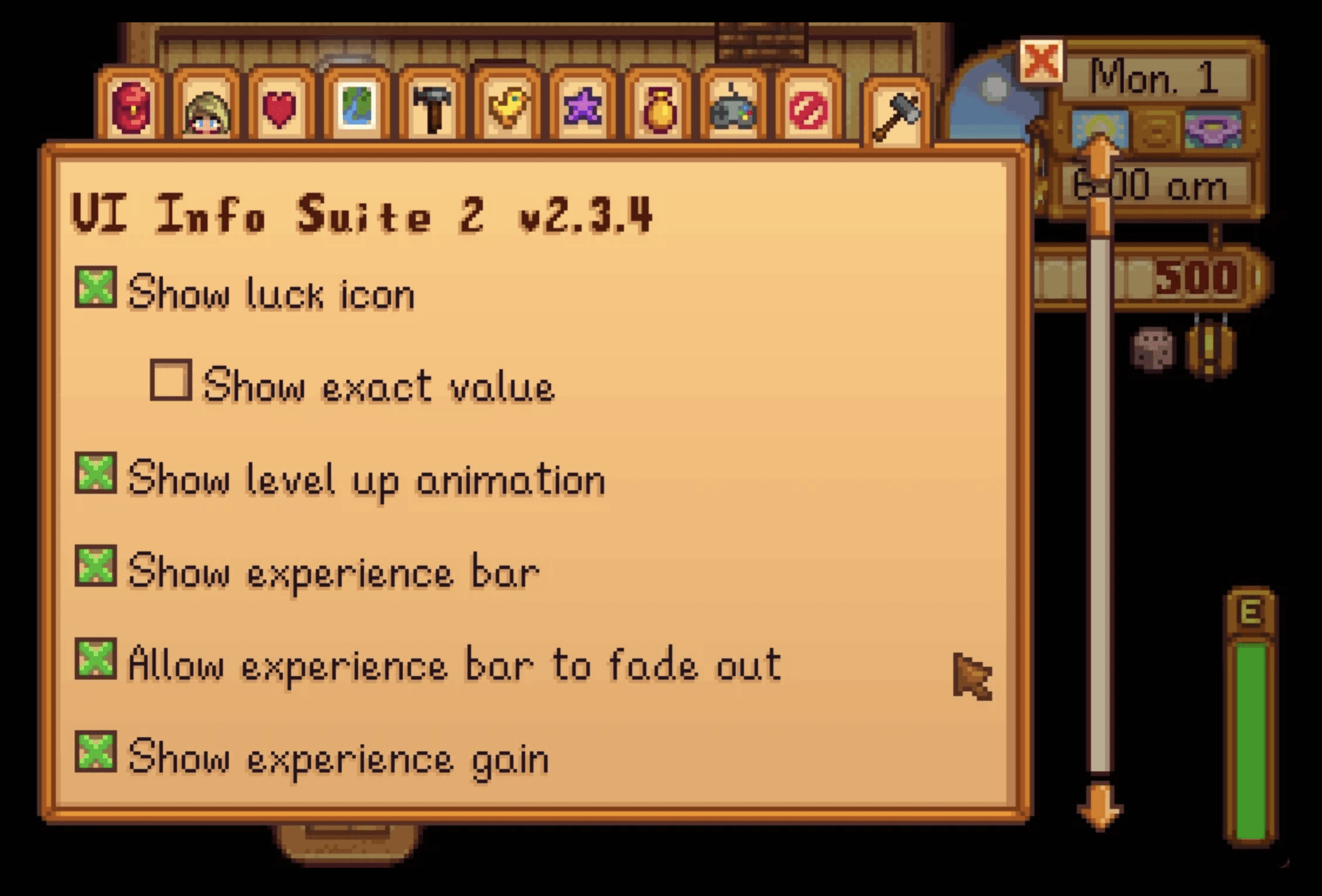
The community already feels these barriers. The two reference mods, UI Info Suite 2 and To-Dew, add up to more than 2.2 million unique downloads. But they make information visible, not manageable, and they stay in the pull model.

UI Info Suite 2

Reveals hidden information (crop growth, birthdays, animal state) via tooltips and the HUD. It proves the demand, but its philosophy is coverage: everything visible, all the time. It answers "what's the state?", not "what needs my attention now?". More visible information isn't less load.

To-Dew

A board for jotting down tasks. But it's reactive: the player still has to notice the deadline and remember to log it, externalizing memory only after the prospective work is already done.

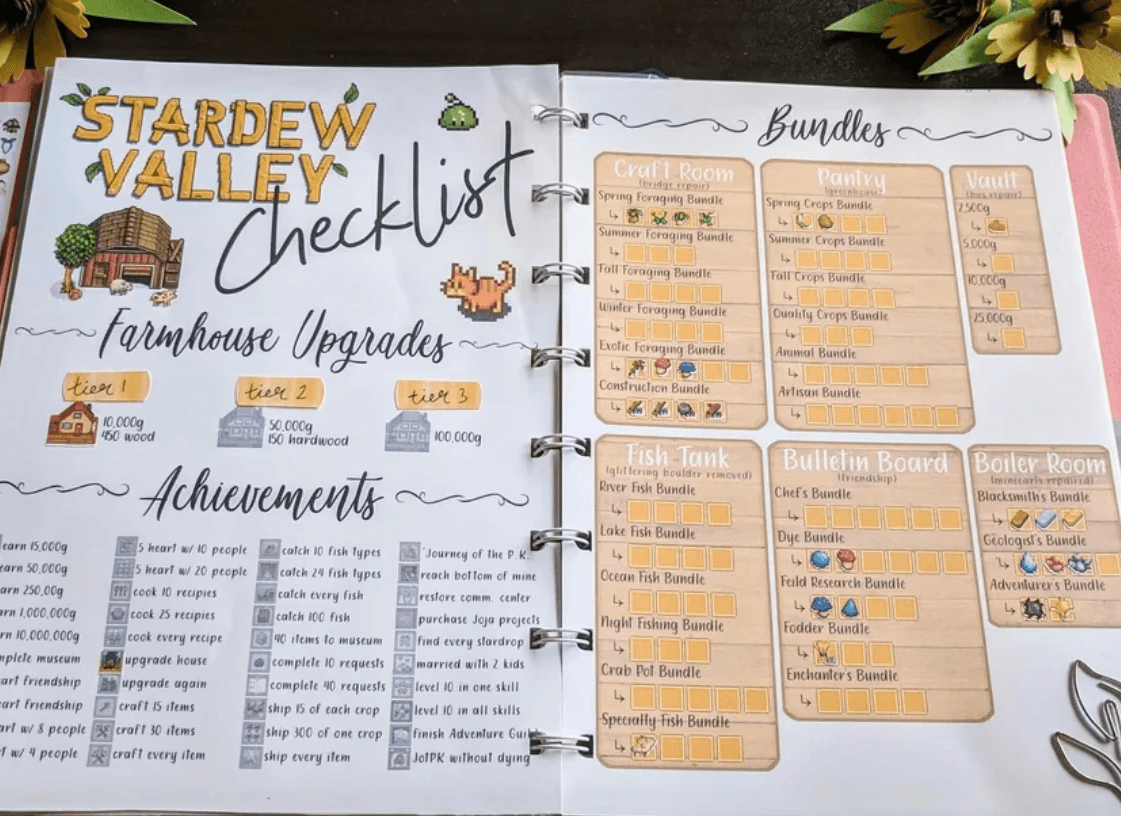
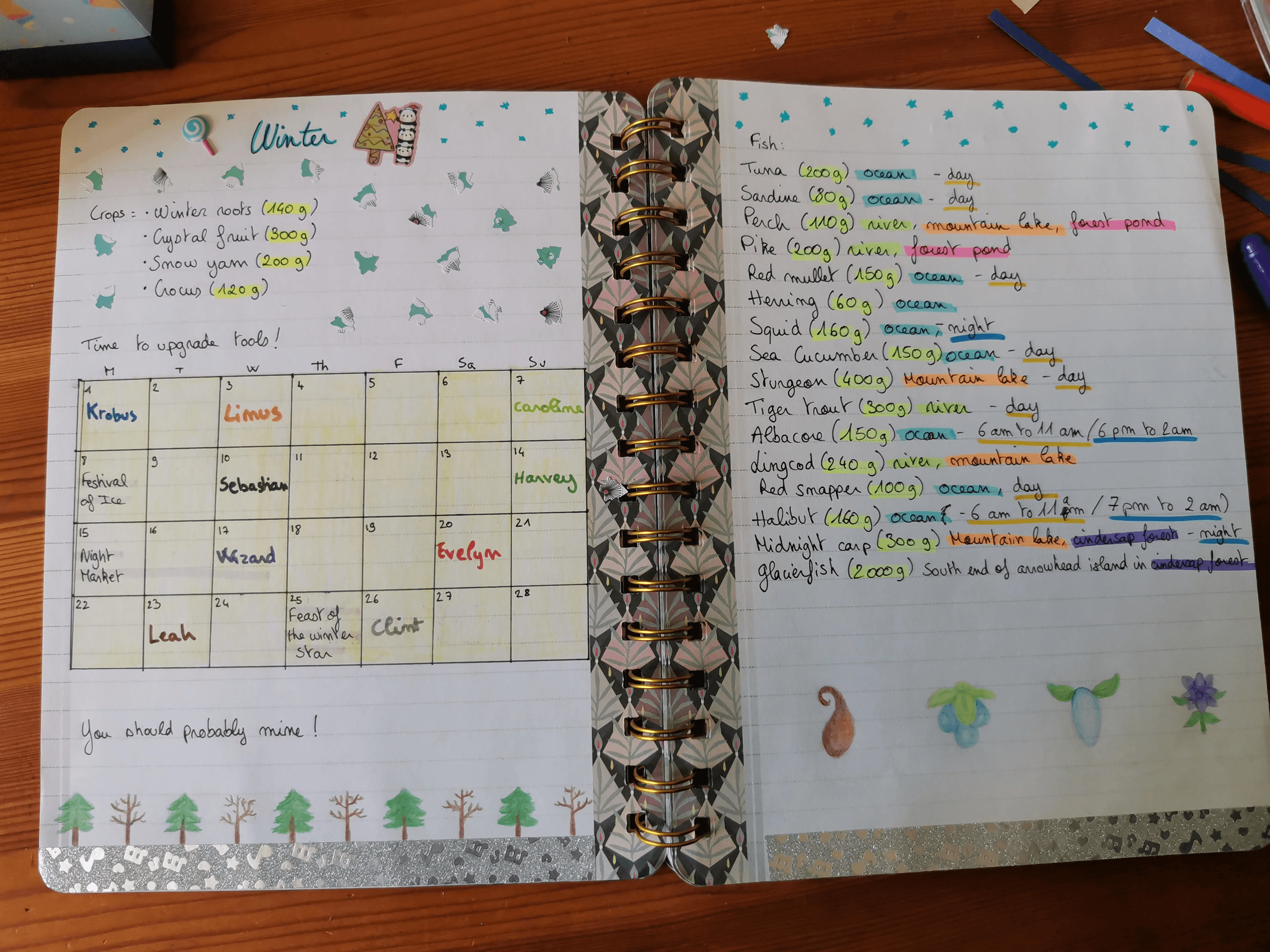
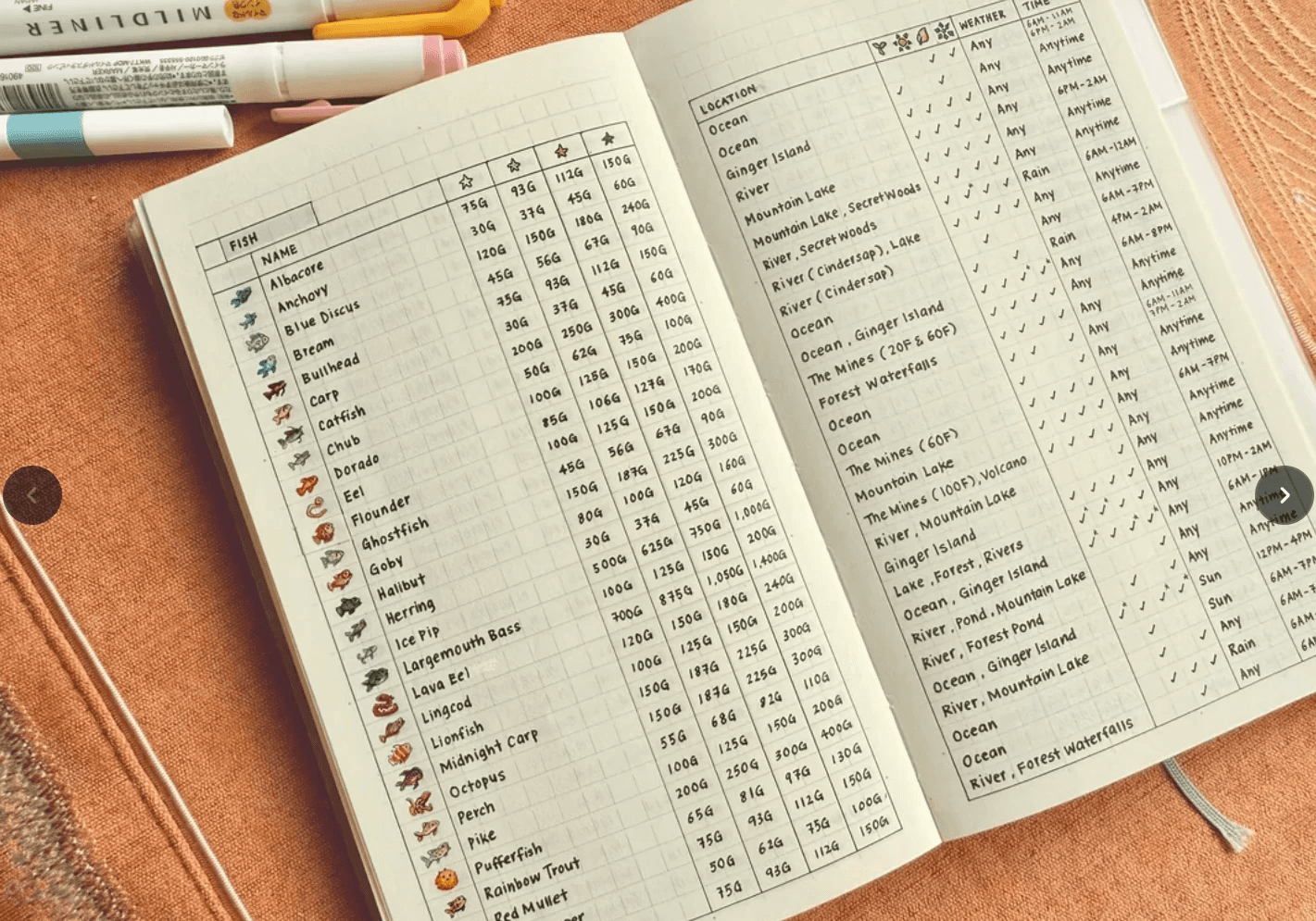
The clearest evidence isn't in the mods — it's on paper. Players keep notebooks, bullet journals, and spreadsheets to hold what the game won't: bundle checklists, gift preferences, fishing conditions, birthday calendars. When people leave the game to manage the game, the workaround itself is the proof — what they rebuild by hand is exactly what the interface should surface, at the moment it matters.

Search "stardew valley checklist" and brace yourself for a world of spreadsheets, printable planners, and handmade notebooks decorated with pixel villagers.

Barriers and Proposals: the four categories

Barriers and Proposals:
the four categories

Category 1: Objective and Deadline Tracking

Category 1: Objective and Deadline Tracking

The game holds every deadline but never surfaces them: the player has to remember what's coming, where to check, and when to act. The proposal adds proactive letters (birthday, planting, quest reminders delivered through the in-game mail, in a villager's voice) and a quest pin on the HUD. The letters close the planning gap by pushing information at the right moment; the pin keeps the chosen objective in view without opening a menu.

THE BARRIER

THE BARRIER

The game hands the player all the information but none of the planning.

The game hands the player all the information but none of the planning.

Play Stardew Valley for a few days and a silent list starts forming in your head: plant the pumpkins before fall ends, don't miss Mayor Lewis's birthday, finish the monster-slaying Special Order before it expires. The information is all there. You can open the journal to check a quest or walk into town to read the calendar. But it rarely comes to you.

Instead, it stays scattered across menus, places, and moments. Keeping track means remembering that something needs attention, remembering where the game stores that information, and remembering to check it again. The information exists, but managing it becomes part of the player's cognitive workload.

Play Stardew Valley for a few days and a silent list starts forming in your head: plant the pumpkins before fall ends, don't miss Mayor Lewis's birthday, wrap up the monster-slaying Special Order before it expires.

The game holds all of it and shows any piece when you ask: opening the journal for a quest, walking into town just to check the calendar. But the information never comes to you. It waits, scattered: one part hidden in a menu, another on a wall across town, and it never resurfaces on its own.

To keep up, the player has to remember that a deadline exists, remember where the game keeps it, and go look. Every day. This is the planning gap: all the information is available, but assembling it into a plan is left entirely to the player.

Six systems, six different places, zero reminders. Welcome to the administrative side of cozy farming.

WHY IT OVERLOADS

WHY IT OVERLOADS

A menu holds the information. Nothing holds the intention.

A menu holds the information. Nothing holds the intention.

The hard part isn't storing the information, it's turning it into a plan. Cognitive science calls this prospective memory: remembering to carry out an intention at the right future moment, not recalling a fact from the past (Einstein & McDaniel, 1990).

It runs in stages: organizing what to do and when, holding that plan in mind, and acting on it at the right moment. An estimated 50 to 80 percent of everyday memory failures are prospective (Kliegel & Martin, 2003).

That's why a system that only stores information doesn't solve the barrier: it still asks the player to form the intention alone. A system that triggers takes on the very stage that fails.

Play Stardew Valley for a few days and a silent list starts forming in your head: plant the pumpkins before fall ends, don't miss Mayor Lewis's birthday, wrap up the monster-slaying Special Order before it expires.

The game holds all of it and shows any piece when you ask: opening the journal for a quest, walking into town just to check the calendar. But the information never comes to you. It waits, scattered: one part hidden in a menu, another on a wall across town, and it never resurfaces on its own.

To keep up, the player has to remember that a deadline exists, remember where the game keeps it, and go look. Every day. This is the planning gap: all the information is available, but assembling it into a plan is left entirely to the player.

Plan


organize the tasks into a plan: what to do, and when

Remember

hold the plan in mind until is needed

Start

begin acting at the right moment or cue

Do

carry the plan out as intended

Prospective memory runs in four steps. In adults with ADHD, only the first, planning, breaks down.  Remembering, starting, and doing stay intact (Fuermaier et al., 2013).

THE PROPOSAL

THE PROPOSAL

The game warns, the player pins.

The game warns, the player pins.

If the planning stage is where memory breaks, the proposal has to act there: not store more information, but deliver it at the moment the player needs to act. The category does this in two moves. One is pull: the player pins a quest to the HUD, keeping it in sight instead of buried in a menu. The other is push: the game sends a letter before the deadline, taking on the trigger the player would have to fire alone.

Play Stardew Valley for a few days and a silent list starts forming in your head: plant the pumpkins before fall ends, don't miss Mayor Lewis's birthday, wrap up the monster-slaying Special Order before it expires.

The game holds all of it and shows any piece when you ask: opening the journal for a quest, walking into town just to check the calendar. But the information never comes to you. It waits, scattered: one part hidden in a menu, another on a wall across town, and it never resurfaces on its own.

To keep up, the player has to remember that a deadline exists, remember where the game keeps it, and go look. Every day. This is the planning gap: all the information is available, but assembling it into a plan is left entirely to the player.

pull

The quest pin

The player pins an active quest to  the HUD. The objective and its days  remaining stay in view, so the  deadline no longer hides inside a  menu.

push

Proactive letters

The game sends a letter the day before a deadline, with  the context needed to act. The game does it on its own.

Birthday — a gift hint, from someone close to the villager

Last planting day — before the season closes the window

Dated quest — before a timed quest expires

Before the proposal: how the game's
mail works

Before the proposal: how the game's
mail works

Letters are the game's mail: messages that arrive in the farm's mailbox and that the player reads right there. Some come on fixed dates; others when a condition is met, and when something is waiting a speech bubble with a letter icon appears above the mailbox. It's a channel the player trusts and already knows how to use, but underused for looking ahead.

Play Stardew Valley for a few days and a silent list starts forming in your head: plant the pumpkins before fall ends, don't miss Mayor Lewis's birthday, wrap up the monster-slaying Special Order before it expires.

The game holds all of it and shows any piece when you ask: opening the journal for a quest, walking into town just to check the calendar. But the information never comes to you. It waits, scattered: one part hidden in a menu, another on a wall across town, and it never resurfaces on its own.

To keep up, the player has to remember that a deadline exists, remember where the game keeps it, and go look. Every day. This is the planning gap: all the information is available, but assembling it into a plan is left entirely to the player.

Standard letters
quests, events, tips, lore, achievements

Friendship letters

heart events & messages from villagers

Repeatable letters
random gifts, by friendship level

FIRST PROPOSAL

FIRST PROPOSAL

✉️ The proactive letters (birthday · planting · quest)

LOAD:

keeping track

MECHANISM:

push (the game sends)

GAG:"Indicate / allow reminder of current objectives during gameplay" (Cognitive · Intermediate)

The strength of this proposal is that it invents nothing. The mail is already there: reliable, part of the player's morning, and a familiar channel. Only two things change: the timing and the voice. Each letter arrives in time for the player to act on it, and comes from a character who would plausibly send that specific message. Pierre can warn about a planting deadline because he sells the seeds; someone close can remind the player about a birthday.

The letter is therefore diegetic (Fagerholt & Lorentzon, 2009): it exists within the game's fiction rather than being layered on top of it, protecting immersion through consistency between sender, content, and world.

There is also a gain beyond the reminder itself. A to-do list like To-Dew supports the player from outside the fiction; the letter becomes part of it. Written in a villager's voice, each reminder can also become a small character moment. It feels less like a practical mod and more like content the game could have shipped with.

Play Stardew Valley for a few days and a silent list starts forming in your head: plant the pumpkins before fall ends, don't miss Mayor Lewis's birthday, wrap up the monster-slaying Special Order before it expires.

The game holds all of it and shows any piece when you ask: opening the journal for a quest, walking into town just to check the calendar. But the information never comes to you. It waits, scattered: one part hidden in a menu, another on a wall across town, and it never resurfaces on its own.

To keep up, the player has to remember that a deadline exists, remember where the game keeps it, and go look. Every day. This is the planning gap: all the information is available, but assembling it into a plan is left entirely to the player.

Details: A game-UI vocabulary: diegesis

The term comes from film theory, but what matters here is the game. A diegetic element is part of the game's internal world, something the characters themselves could see or interact with. A non-diegetic element exists outside that world, visible only to the player, like a health bar floating on top of the screen. Fagerholt & Lorentzon (2009) mapped this distinction into a framework for game interfaces. The full thesis, Beyond the HUD: User Interfaces for Increased Player Immersion in FPS Games, is available at Chalmers University's library.

Details: A game-UI vocabulary: diegesis

The term comes from film theory, but what matters here is the game. A diegetic element is part of the game's internal world, something the characters themselves could see or interact with. A non-diegetic element exists outside that world, visible only to the player, like a health bar floating on top of the screen. Fagerholt & Lorentzon (2009) mapped this distinction into a framework for game interfaces. The full thesis, Beyond the HUD: User Interfaces for Increased Player Immersion in FPS Games, is available at Chalmers University's library.

✉️ 🌱 Crop Reminder: the letter on the eve of each planting deadline

Most crops die on the first day of the next season, and each one has its own last possible planting day, counted backward from when it needs to harvest. The game shows the growth time in the seed's tooltip, but doing the math and remembering the deadline is left to the player. The letter arrives on the eve of that day, naming the crop and its deadline. The sender is Pierre, who owns the General Store and sells the seeds: he has reason to keep track.

Since some crops share the same last planting day, their letters can pile up. The frequency is configurable: one letter per crop by default (small notes are easier to act on than a dense list), with the option to switch to a weekly digest.

Crop Alert Per Crop

Weekly Crop Alert

From strategy to execution, we create authentic brand experiences that connect with your audience and foster lasting relationships

Weekly in-game letter from Pierre over the farm with crop planting deadlines.

Crop Alert Per Crop

One letter per crop, one day before its planting deadline. Each note names the crop and the last day to plant it. Small notes are easier to act on than a long list: one crop, one decision.

Weekly Crop Alert

In-game letter from Pierre displayed over the town scene with a highlighted seed icon.

✉️ 🎁 Birthday reminder: the letter on the eve of the birthday

Stardew Valley has 34 villagers with birthdays, each on a fixed day. A gift on a birthday is worth eight times the usual friendship, and if you miss it, that bonus is gone for a year. Each villager has their own taste: a handful of loved gifts, a few liked ones, and plenty they dislike or hate, across hundreds of items. The date is on the calendar at Pierre's shop, but the player has to remember to check it and figure out what to bring. Two things to hold in your head, almost every other day, all year.

Wrong gift. One year to recover. Or five minutes on the wiki. We’ve all been there.

On the eve of the birthday, a letter arrives, one day early so the player has time to buy or craft the gift. It includes a hint at a gift the villager likes (never one they love, that's left as the player's discovery).

The hint changes by year: in the first year, the letter is narrative, from someone close to the birthday person; from the second year on, it's random, from one of four town figures matched to the gift.

Narrative (Year 1)

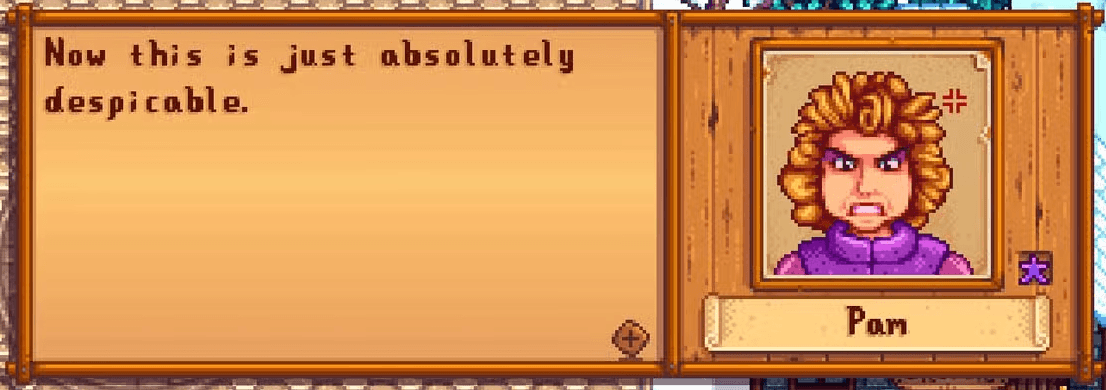
From someone close to the birthday person, drawn from the game's relationships. In this example, Pam writes about her daughter Penny's birthday. The two have a strained relationship the game itself explores, so the reminder doubles as a character moment.

Random (Year 2+)

In-game letter with Penny’s portrait and a gift icon beside it.

Narrative (Year 1)

From someone close to the birthday person, drawn from the game's relationships. In this example, Pam writes about her daughter Penny's birthday. The two have a strained relationship the game itself explores, so the reminder doubles as a character moment.

Random (Year 2+)

In-game letter with Penny’s portrait and a gift icon beside it.

✉️ ❗️ Quest reminder: the game warns before the quest is lost

Not every forgotten quest is lost for the same reason. Before the letters, it's worth seeing how quests work today:

A quest can arrive by mail or by a board in town. Some have no deadline (Story Quests); others run against the clock (Help Wanted, Special Orders). Either way, it lands in the journal. The journal button pulses when something new comes in, but after that first signal, it goes quiet. To check the objective, the deadline, or how far along you are, the player has to open the journal, find the quest, and read through it every time.


Quest journal listing active quests by title.

Every quest ends up in the same journal. Good luck remembering to open it.

The proposal is two new letters, one for each kind of forgetting:

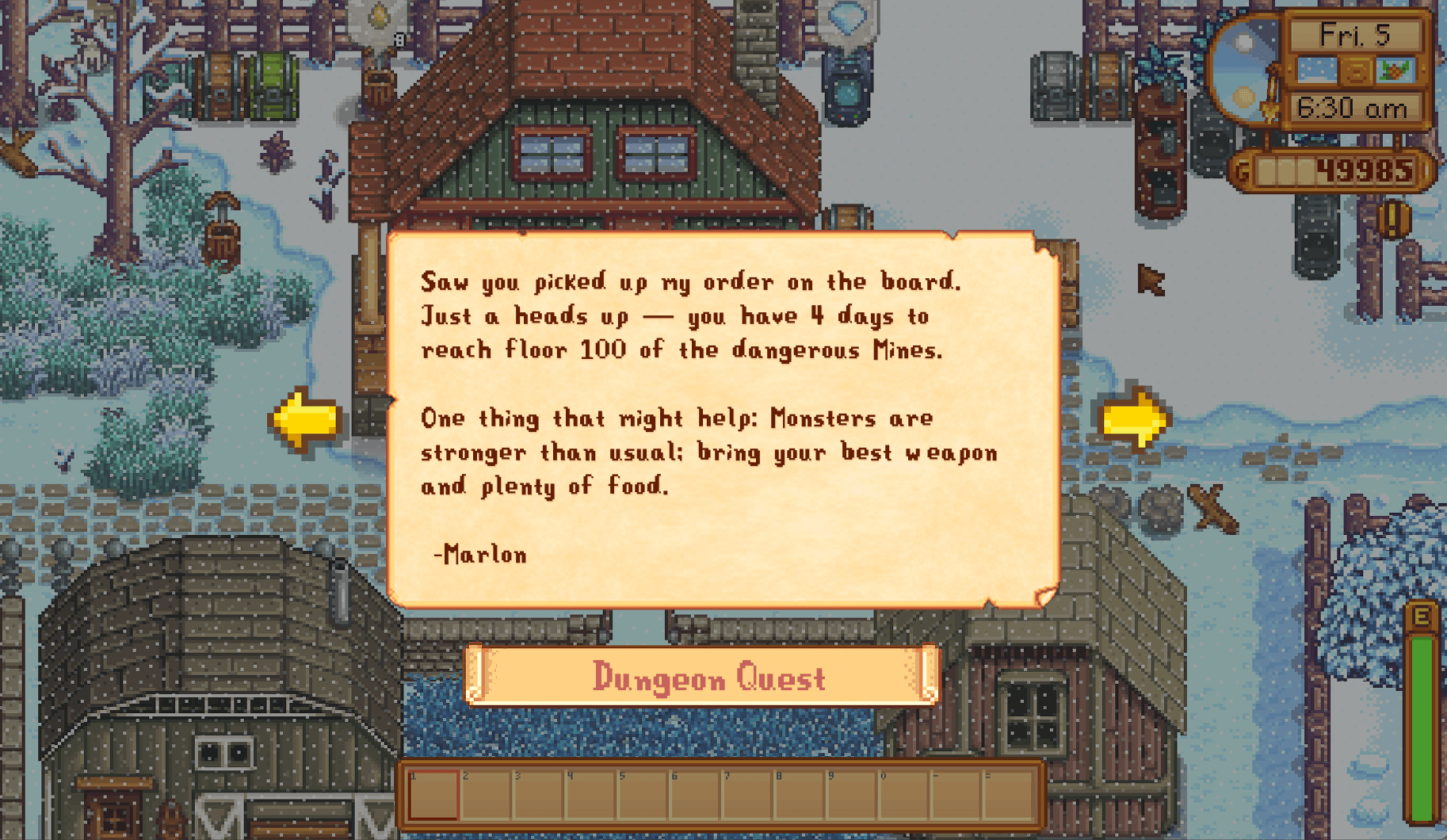
1. The Special Orders letter (quest with a deadline). These are community requests posted on the town board: gather materials, slay monsters, catch fish, within a fixed number of days. Miss the day, lose the reward. The player knows the deadline exists, but the journal never speaks up again after the first pulse.

The letter arrives around the last quarter of the timeframe, early enough to act. It reminds what to do, when it's due, and carries a new hint to help get it done. Signed by whoever posted the order.

Every Special Order was mapped by hand: I wrote a letter template for each one, with variables for the sender, the deadline, the task, and a hint matched to the request. The full spreadsheet holds every combination.

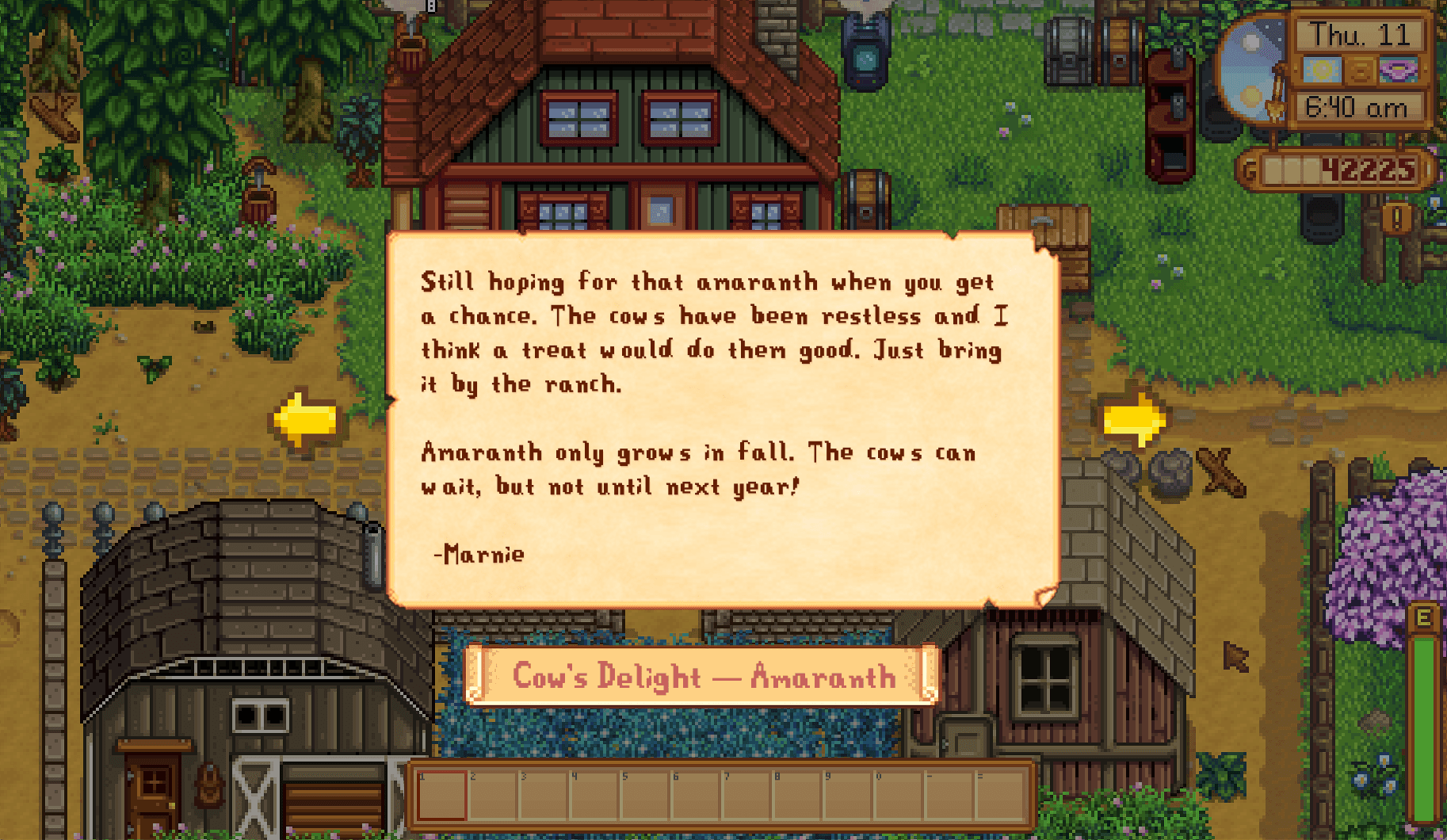
2. The Story Quests letter (quest with no deadline). These are plot-driven quests that arrive by mail: a villager asks the player to find and deliver a specific item, tied to the story and the characters' lives. No deadline sounds forgiving until you forget. Nothing prompts the memory, the quest sinks into the routine, and most ask for a seasonal item. Miss the season, wait a full year.

The letter arrives three days after the quest is received, before the window closes. It puts the quest back in view, naming the item and who to deliver it to, written in the villager's voice so the hint reads as conversation, not instruction. I mapped every story quest in the game and wrote each letter individually.

SECOND PROPOSAL

SECOND PROPOSAL

📍 Pin the quest on screen

LOAD:

keeping track

MECHANISM:

pull (the player chooses to pin)

GAG:"Indicate / allow reminder of current objectives during gameplay" (Cognitive · Intermediate).

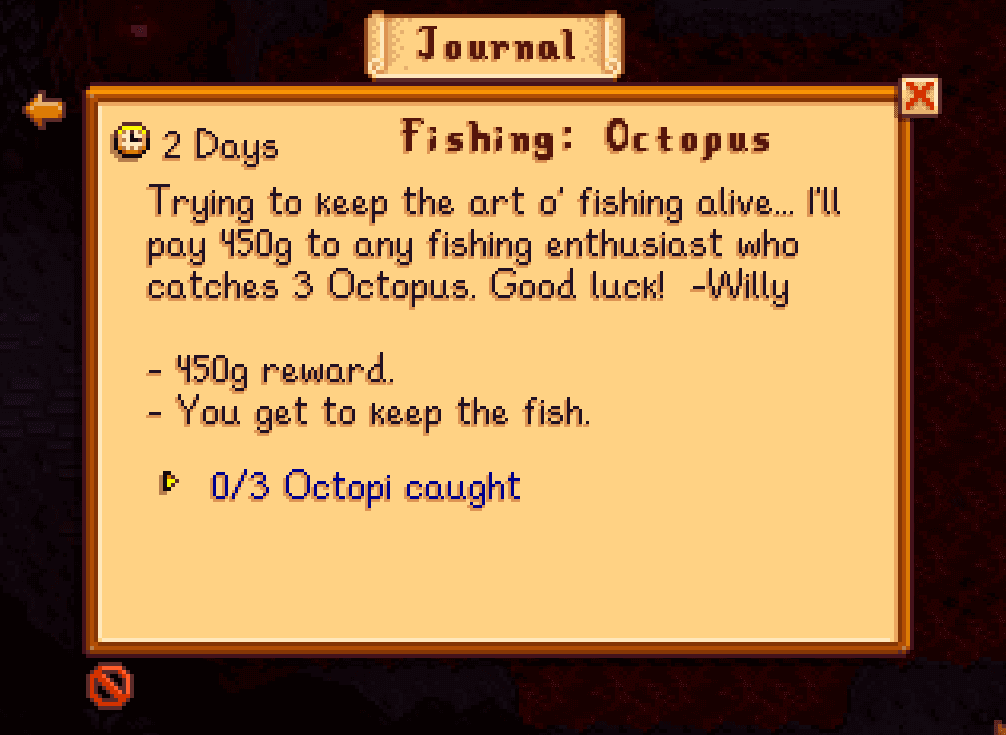
The letters bring the quest to the player. The pin makes the complementary move. The journal already holds everything: the objective, a description, and the remaining days. But none of it reaches the HUD. The only way to check is to open the menu, read, close it, and hold the details in your head while you play. Most games with quests already offer a tracker; Stardew doesn't. The pin adds one.

Play Stardew Valley for a few days and a silent list starts forming in your head: plant the pumpkins before fall ends, don't miss Mayor Lewis's birthday, wrap up the monster-slaying Special Order before it expires.

The game holds all of it and shows any piece when you ask: opening the journal for a quest, walking into town just to check the calendar. But the information never comes to you. It waits, scattered: one part hidden in a menu, another on a wall across town, and it never resurfaces on its own.

To keep up, the player has to remember that a deadline exists, remember where the game keeps it, and go look. Every day. This is the planning gap: all the information is available, but assembling it into a plan is left entirely to the player.

Quest journal entry for 'Fishing: Octopus' showing details, deadline, and progress.

Sure, Willy. Let me file this right next to the other ten things in my head I'm definitely not going to remember.

📍 The Quest Pin:

A new icon, drawn in the game's pixel style to match the existing ones, marks whether a quest is pinned or not. It sits next to Cancel, inside the quest: one click sends the quest to a compact box on the HUD; another unpins it.

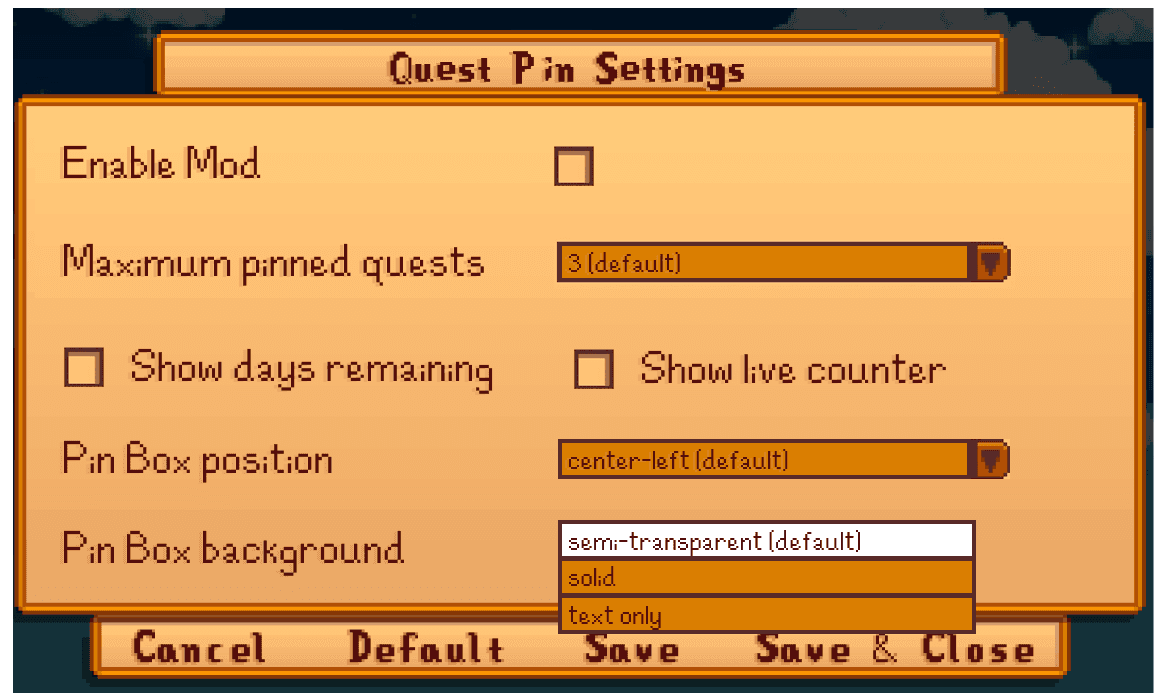
Each pinned quest shows the name, the objective, a live counter, and the days left: exactly what the player would open the journal to check. Up to three fit at once (configurable), and the count shows in the header. When a quest is completed, the pin vanishes on its own.

Explore the prototype

The pin is pull: the player chooses to use it. To compensate, the empty box stays on screen on purpose, with a shortcut to the journal, so the player doesn't have to remember the feature exists.

The flag that marks a pinned quest uses shape and contrast, not color alone, to tell its states apart (GAG: "Ensure no essential information is conveyed by a fixed colour alone," Vision · Basic).

Every option is configurable through GMCM: how many quests to pin, where the box sits, whether to show the counter and days remaining, and the background transparency. The default works out of the box.

Settings menu

Category 2: Information Archive

Category 2: Information Archive

Letters are already saved in Collections since version 1.4, but the archive was built as a record, not a retrieval tool. The proposal adds a dedicated Mail tab with an icon per letter type (quest, gift, event, friendship, info, planting) and filters by type and sender, so the letters from Category 1 stay findable after they leave the mailbox.

THE BARRIER

THE BARRIER

The game hands the player all the information but none of the planning.

The game hands the player all the information but none of the planning.

The game keeps your letters. Since version 1.4 (2019), received mail sits in the Collections menu and can be reopened, but they show up in the order they arrived, as identical thumbnails, with no type, no filter, and no way to tell a recipe from a quest without opening each one.


Most of the base game's correspondence rarely needs a second look. But the moment the mail starts carrying letters worth revisiting, a collection you can't search becomes a real retrieval gap.

Play Stardew Valley for a few days and a silent list starts forming in your head: plant the pumpkins before fall ends, don't miss Mayor Lewis's birthday, wrap up the monster-slaying Special Order before it expires.

The game holds all of it and shows any piece when you ask: opening the journal for a quest, walking into town just to check the calendar. But the information never comes to you. It waits, scattered: one part hidden in a menu, another on a wall across town, and it never resurfaces on its own.

To keep up, the player has to remember that a deadline exists, remember where the game keeps it, and go look. Every day. This is the planning gap: all the information is available, but assembling it into a plan is left entirely to the player.

Collections letters tab showing identical envelope thumbnails.

It's like Where's Waldo, but every Waldo is wearing the same shirt.

WHY IT OVERLOADS

WHY IT OVERLOADS

The cost moves from remembering to retrieving.

The cost moves from remembering to retrieving.

An external store only eases memory if you can get back to what's in it.

Cognitive offloading (Risko & Gilbert, 2016) is how people cope with limited working memory, but the relief only holds while retrieval is cheap. When it isn't, the cost moves from remembering the content to finding it. Information architecture calls this findability: "you can't use what you can't find" (Morville, 2005).

For the letters the player comes back to, the archive needs to get retrieval right: the letter you're after should turn up the moment you look for it.

Play Stardew Valley for a few days and a silent list starts forming in your head: plant the pumpkins before fall ends, don't miss Mayor Lewis's birthday, wrap up the monster-slaying Special Order before it expires.

The game holds all of it and shows any piece when you ask: opening the journal for a quest, walking into town just to check the calendar. But the information never comes to you. It waits, scattered: one part hidden in a menu, another on a wall across town, and it never resurfaces on its own.

To keep up, the player has to remember that a deadline exists, remember where the game keeps it, and go look. Every day. This is the planning gap: all the information is available, but assembling it into a plan is left entirely to the player.

Details: The four systems behind retrieval

The information architecture literature defines four systems that make retrieval work (Rosenfeld, Morville & Arango, 2015): organization, labeling, navigation, and search. Organization groups items by a meaningful criterion. Labeling gives each item a recognizable identity. Navigation places the collection where the user would look for it. And search lets the user narrow the list by attribute.

Details: The four systems behind retrieval

The information architecture literature defines four systems that make retrieval work (Rosenfeld, Morville & Arango, 2015): organization, labeling, navigation, and search. Organization groups items by a meaningful criterion. Labeling gives each item a recognizable identity. Navigation places the collection where the user would look for it. And search lets the user narrow the list by attribute.

THE PROPOSAL

THE PROPOSAL

📬 Mail Tab: From record to tool.

LOAD:

keeping track

MECHANISM:

pull (the player retrieves in menu)

GAG:"Allow all narrative and instructions to be replayed" (Cognitive · Advanced)

If the planning stage is where memory breaks, the proposal has to act there: not store more information, but deliver it at the moment the player needs to act. The category does this in two moves. One is pull: the player pins a quest to the HUD, keeping it in sight instead of buried in a menu. The other is push: the game sends a letter before the deadline, taking on the trigger the player would have to fire alone.

Play Stardew Valley for a few days and a silent list starts forming in your head: plant the pumpkins before fall ends, don't miss Mayor Lewis's birthday, wrap up the monster-slaying Special Order before it expires.

The game holds all of it and shows any piece when you ask: opening the journal for a quest, walking into town just to check the calendar. But the information never comes to you. It waits, scattered: one part hidden in a menu, another on a wall across town, and it never resurfaces on its own.

To keep up, the player has to remember that a deadline exists, remember where the game keeps it, and go look. Every day. This is the planning gap: all the information is available, but assembling it into a plan is left entirely to the player.

📬 Mail Tab

📬 Mail Tab

The proposal is a real mail archive: its own tab in the menu, next to Inventory, Skills, and Collections, always a click away. Inside, each letter gets a small icon set by its intent, so you can tell at a glance what each one is, and the list can be sorted or filtered by type or by sender. The reminder letters from Category 1 keep living here too: when a birthday, planting, or quest letter leaves the mailbox, it stays available to be pulled back.

Six icons, each tied to the context of the letter: a quest, a gift, an event, a relationship, a piece of lore, or a farming reminder. The base game's letters and the mod's share the same icons when the context matches.

Icon

Exclamation

Gift box

Calendar

Heart

Speech bubble

Crop

What goes here

the letter that gives the quest (base game) and the quest reminder (mod)

a villager's gift, a recipe, and the birthday reminder (mod)

a festival or event announcement

friendship letters and heart events, when the intent is the bond

lore, a personal letter, a tip, a tutorial, a notice, a reward or stock

the planting reminder (mod)

Icon

Exclamation

Gift box

Calendar

Heart

Speech bubble

Crop

What goes here

the letter that gives the quest (base game) and the quest reminder (mod)

a villager's gift, a recipe, and the birthday reminder (mod)

a festival or event announcement

friendship letters and heart events, when the intent is the bond

lore, a personal letter, a tip, a tutorial, a notice, a reward or stock

the planting reminder (mod)

Explore the prototype

Category 3: Farm State Feedback

Category 3: Farm State Feedback

Dry soil differs from watered by a faint shade; unfed and unpetted animals show nothing at all. The player has to scan every tile and enter every building to check. The proposal adds proximity markers (a half-drop for watering, a half-heart for petting) that pulse near the player and fade with distance, plus a count on the HUD for watering and feeding. Both are glanceable, read preattentively, and fully customizable.

Before getting into the category, it's worth pinning down a few game terms that come up throughout:

Term

Tile

Watering

Feeding

Petting

Mood

Friendship

Barn / Coop

Hay

What it is

The smallest unit of the game's grid. Each crop bed takes one.

Using the watering can (manual) or sprinklers (automatic).
Without water, the crop doesn't advance that day.

One hay per animal per day, or grass if they graze. Without food, no produce that day.

Clicking on the animal. Raises mood and, over time, friendship.

The animal's daily state. Combined with friendship, it determines whether produce
comes out large and at what quality (silver, gold, iridium).

The long-term bond with the animal. It sets the consistency and level of the products.

Barn houses larger livestock (cows, goats, sheep, pigs, ostriches);
coop houses poultry and the like (chickens, ducks, rabbits, dinosaurs)

The animals' food, cut from grass with the scythe and stored in the silo.

One hay per animal per day, when they aren't grazing.

THE BARRIER

THE BARRIER

The state of the world should be noticed, not hunted.

The state of the world should be noticed, not hunted.

The game tracks the whole state of the farm, but shows almost none of it. Watered soil is only a shade darker than dry; an empty trough only shows inside the building; whether an animal has been petted is buried in a menu, not visible on the farm itself, even though a missed day quietly lowers its mood and, over time, its friendship.


A forgotten task usually surfaces the next morning, when the crop hasn't grown, too late to fix. The player is left sweeping each tile, checking each barn, holding the whole farm in their head.

This is the feedback gap: the state is there, but reading it is on you.

Play Stardew Valley for a few days and a silent list starts forming in your head: plant the pumpkins before fall ends, don't miss Mayor Lewis's birthday, wrap up the monster-slaying Special Order before it expires.

The game holds all of it and shows any piece when you ask: opening the journal for a quest, walking into town just to check the calendar. But the information never comes to you. It waits, scattered: one part hidden in a menu, another on a wall across town, and it never resurfaces on its own.

To keep up, the player has to remember that a deadline exists, remember where the game keeps it, and go look. Every day. This is the planning gap: all the information is available, but assembling it into a plan is left entirely to the player.

WHY IT OVERLOADS

WHY IT OVERLOADS

The player's eyes replace the missing feedback.

The player's eyes replace the missing feedback.

Reading the farm's state is a visual-search problem. A dry tile differs from a watered one only by a slight shift in shade, so it doesn't pop out on its own (Treisman & Gelade, 1980). Two things stack up:

High similarity, slow serial search. The eye hunts tile by tile, and the cost grows with every tile in the field (Duncan & Humphreys, 1989).

An attention system already strained. Selective visual attention, the system this search depends on, is less efficient in ADHD, both stimulus-driven and goal-driven (Klein & Mavritsaki, 2025). A slow search on a strained system.

The result: low-salience targets, in large numbers, searched by an attention system already stretched thin.

Play Stardew Valley for a few days and a silent list starts forming in your head: plant the pumpkins before fall ends, don't miss Mayor Lewis's birthday, wrap up the monster-slaying Special Order before it expires.

The game holds all of it and shows any piece when you ask: opening the journal for a quest, walking into town just to check the calendar. But the information never comes to you. It waits, scattered: one part hidden in a menu, another on a wall across town, and it never resurfaces on its own.

To keep up, the player has to remember that a deadline exists, remember where the game keeps it, and go look. Every day. This is the planning gap: all the information is available, but assembling it into a plan is left entirely to the player.

Side-by-side visual search comparison: pop-out effect with a single blue dot versus scanning visually similar farm soil tiles.

If the barrier is a slow, serial search, the fix is its inverse. Glanceable design is information built to be read "with low cognitive effort," in a single glance, without pulling focus from the main task (Matthews, Forlizzi & Rohrbach, 2006). It works through preattentive processing: the brain categorizes basic features (colour, shape, size, motion) in parallel, before conscious attention, in under ~250 ms (Healey & Enns, 2012; Ware, 2020). The feedback gap forces a tile-by-tile hunt; a glanceable signal is read preattentively, in parallel.

Match expectations

form platers already know

Abstract

stripped to the minimum

Distinct

stands out by contrast

Consistent

one visual language

Proximity markers

A water-drop over each dry plant, a half-heart over each unpetted animal. Faint at a distance, full on approach or hover.

Match

Distinct

Abstract

Consistent

HUD Count

A running count in the HUD: "[N] crops need watering", "[N] animals need feeding".

Match

Abstract

Consistent

FIRST PROPOSAL

FIRST PROPOSAL

🌱 🐄 Farm State Feedback

LOAD:

keeping track

MECHANISM:

push (ambient/peripheral)

GAG:"Ensure no essential information is conveyed by a fixed colour alone" (Vision · Basic)
"Avoid placing essential temporary information outside the player's eye-line" (Vision · Intermediate) "Provide an option to turn off / hide all non-interactive elements" (Cognitive · Advanced).

The first two are Vision: the project's scope is cognitive, but since the load here is a costly visual search, solving it also benefits players with low vision. The third is the cognitive anchor, the control to reduce or turn off the markers.

🌱 🐄 Farm State Feedback Markers

🌱 🐄 Farm State Feedback Markers

Perception and cognition aren't separate systems. When the eye can't catch something automatically, the cost falls on attention and working memory, which is exactly the cognitive system this project deals with. That's why the guideline is "Vision" on paper, but cognitive in effect, for these players.

I thought of two markers, one for each task where reading the state fails:

  • Watering: an unwatered tile can be hard to see, especially in a large field.

  • Petting: here there's no marker at all. To know which animals still need petting that day, the player has to test them one by one or open the Animals tab in the menu, which shows it but requires stopping the game to go check.

To reduce this visual search effort, contextual markers provide immediate feedback for daily tasks like watering crops and petting farm animals.

The system operates dynamically based on player proximity and task state:

Four-step lifecycle diagram of the crop watering marker showing proximity feedback from morning to completion.
Four-step lifecycle diagram of the animal petting marker showing proximity feedback from morning to completion.

I drew the two markers following Gestalt principles: they're incomplete shapes (a half-drop, a half-heart) that the brain tends to complete, the principle of closure, and the half-heart echoes the heart the game shows when petting, so it's recognized instantly.

The markers work within a 5×5 tile area centred on the player. Inside it, the marker appears at full opacity; outside, it drops to 20%, using opacity as a visual variable (Bertin, 1967) to control the hierarchy: far sits in the background of attention, near rises.

As the game offers tools that automate watering (sprinklers), feeding (autofeed), and petting (Auto-Petter), the marker can be turned off. The interface only exists while it's needed.

I drew the two markers following Gestalt principles: they're incomplete shapes (a half-drop, a half-heart) that the brain tends to complete, the principle of closure, and the half-heart echoes the heart the game shows when petting, so it's recognized instantly.

The markers work within a 5×5 tile area centred on the player. Inside it, the marker appears at full opacity; outside, it drops to 20%, using opacity as a visual variable (Bertin, 1967) to control the hierarchy: far sits in the background of attention, near rises.

As the game offers tools that automate watering (sprinklers), feeding (autofeed), and petting (Auto-Petter), the marker can be turned off. The interface only exists while it's needed.

Putting an icon over every object gave me pause, because filling the screen with markers also costs attention. GAG doesn't forbid showing information, but it points toward giving the player control to hide or reduce elements through exposing as many variables as possible for fine-tuning ("Allow gameplay to be fine-tuned by exposing as many variables as possible", General · Intermediate).

That's how I settled it: the tool is fully customizable, to fit whatever works for each player. It's the trade-off accessibility often imposes: the solution that removes a barrier isn't always the cleanest on screen, and one guideline can run into another.

Mockup of crop and livestock proximity markers with visual fade.

Explore the prototype

Explore the prototype. Use the arrow keys or click to navigate.

Putting an icon over every object gave me pause, because filling the screen with markers also costs attention. GAG doesn't forbid showing information, but it points toward giving the player control to hide or reduce elements through exposing as many variables as possible for fine-tuning ("Allow gameplay to be fine-tuned by exposing as many variables as possible", General · Intermediate).

That's how I settled it: the tool is fully customizable, to fit whatever works for each player. It's the trade-off accessibility often imposes: the solution that removes a barrier isn't always the cleanest on screen, and one guideline can run into another.

I drew the two markers following Gestalt principles: they're incomplete shapes (a half-drop, a half-heart) that the brain tends to complete, the principle of closure, and the half-heart echoes the heart the game shows when petting, so it's recognized instantly.

The markers work within a 5×5 tile area centred on the player. Inside it, the marker appears at full opacity; outside, it drops to 20%, using opacity as a visual variable (Bertin, 1967) to control the hierarchy: far sits in the background of attention, near rises.

As the game offers tools that automate watering (sprinklers), feeding (autofeed), and petting (Auto-Petter), the marker can be turned off. The interface only exists while it's needed.

Putting an icon over every object gave me pause, because filling the screen with markers also costs attention. GAG doesn't forbid showing information, but it points toward giving the player control to hide or reduce elements through exposing as many variables as possible for fine-tuning ("Allow gameplay to be fine-tuned by exposing as many variables as possible", General · Intermediate).

That's how I settled it: the tool is fully customizable, to fit whatever works for each player. It's the trade-off accessibility often imposes: the solution that removes a barrier isn't always the cleanest on screen, and one guideline can run into another.

Settings menu

Farm State Feedback settings menu showing proximity, opacity, and size options for markers.

Let's talk about inclusive design!

natmendes.design@gmail.com

© 2026 Nathalia Mendes

Built to meet WCAG 2.2 AA. Found a barrier? Let me know.

Let's talk about inclusive design!

natmendes.design@gmail.com

© 2026 Nathalia Mendes

Built to meet WCAG 2.2 AA. Found a barrier? Let me know.